

Post-Processing
Post-processing effects run after your scene has been drawn. In FragmentColor they typically live in a fullscreen-triangle pass that samples a previously-rendered scene texture and reshapes it — darkening the corners, splitting RGB channels, snapping to a low-resolution grid, quantizing colors, sharpening edges. The registry exposes each effect as a single pure WGSL function so you can mix and match without committing to a full pipeline.
Pull one into a composition by slug, then call it from your fragment stage. The previews below apply each helper to a synthetic input image (soft rings on a gradient) so the effect is visible in isolation:
let main = r#"@fragment fn fs_main(in: VertexOutput) -> @location(0) vec4<f32> { let v = vignette(in.uv, 0.4, 0.45); let scene = textureSample(scene_tex, scene_sampler, in.uv).rgb; return vec4<f32>(scene * v, 1.0);}"#;let shader = Shader::new(&["postfx/vignette", main])?;chromatic_offsets
Section titled “chromatic_offsets”Returns three UVs (R, G, B) packed as the columns of a mat3x2<f32>,
split radially from the center by strength. Use the columns to drive
three separate texture samples for a chromatic-aberration look.
fn chromatic_offsets(uv: vec2<f32>, strength: f32) -> mat3x2<f32>
crt_curvature
Section titled “crt_curvature”CRT-style barrel warp. Returns the warped UV in .xy and an
out-of-bounds flag in .z (negative when the warped sample falls outside
the unit square). Multiply your sampled color by step(0.0, .z) to mask
the corners.
fn crt_curvature(uv: vec2<f32>, amount: f32) -> vec3<f32>
film_grain
Section titled “film_grain”Additive grain scalar in [-1, 1], derived from a hash of uv and a
seed. Pass the normalized fragment coordinate; the hash scales it
internally so neighboring pixels decorrelate into per-pixel grain.
Multiply by a strength factor and add to your color. Vary seed
per frame (e.g. with a time uniform) to decorrelate grain across frames.
fn film_grain(uv: vec2<f32>, seed: f32) -> f32
gaussian_weight_1d
Section titled “gaussian_weight_1d”1D Gaussian weight at offset x with standard deviation sigma. Use to
build separable blur kernels — sample the same function at neighbor
offsets, accumulate weighted samples, and divide by the summed weights.
The preview plots the function as a vertical bar height across x.
fn gaussian_weight_1d(x: f32, sigma: f32) -> f32
invert
Section titled “invert”Per-channel color inversion (1 - c). Trivial, but having it in the
registry keeps composed shader sources self-documenting.
fn invert(c: vec3<f32>) -> vec3<f32>
pixelate_uv
Section titled “pixelate_uv”Snap a UV to a grid of cells cells per unit side. Use it as a
pre-sample hook: sample your texture with the snapped UV instead of the
raw fragment UV, and the result reads as low-resolution pixels.
fn pixelate_uv(uv: vec2<f32>, cells: vec2<f32>) -> vec2<f32>
posterize
Section titled “posterize”Quantize a color to steps discrete levels per channel. Larger steps
keeps more tonal detail; smaller values produce a hard, poster-like look.
fn posterize(c: vec3<f32>, steps: f32) -> vec3<f32>
scanlines
Section titled “scanlines”Horizontal scanline multiplier in [1 - strength, 1]. lines controls
density (lines per UV unit) and strength controls how dark the dark
bands get. Multiply against your color.
fn scanlines(uv: vec2<f32>, lines: f32, strength: f32) -> f32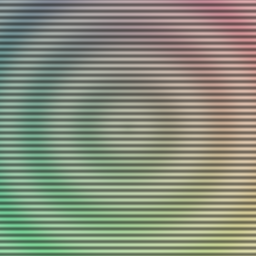
sharpen_3x3
Section titled “sharpen_3x3”Center-weighted sharpen kernel applied to a 3x3 neighborhood. Pass the
nine already-sampled colors in row-major order (c00 top-left through
c22 bottom-right) and an amount in [0, 1]: 0 returns the center
color unchanged, larger values lift edges harder.
fn sharpen_3x3( c00: vec3<f32>, c10: vec3<f32>, c20: vec3<f32>, c01: vec3<f32>, c11: vec3<f32>, c21: vec3<f32>, c02: vec3<f32>, c12: vec3<f32>, c22: vec3<f32>, amount: f32,) -> vec3<f32>
sobel_magnitude
Section titled “sobel_magnitude”Sobel edge magnitude from a 3x3 luminance neighborhood. Pass the nine
luminances (row-major, l00 top-left through l22 bottom-right) and
multiply or threshold the result for a quick edge-detection pass.
fn sobel_magnitude( l00: f32, l10: f32, l20: f32, l01: f32, l11: f32, l21: f32, l02: f32, l12: f32, l22: f32,) -> f32
threshold
Section titled “threshold”Binary step per channel at threshold t: components below t become
0, components at or above become 1. Useful for masks and stylized
high-contrast looks.
fn threshold(c: vec3<f32>, t: f32) -> vec3<f32>
vignette
Section titled “vignette”Multiplier in [0, 1] that darkens edges. radius is the distance from
the center where the falloff begins, and softness is its width.
Multiply against your scene color for a classic vignette.
fn vignette(uv: vec2<f32>, radius: f32, softness: f32) -> f32